Cloud & Platform
Azure & AWS Cloud Engineering
Migrate, modernise and build on Microsoft Azure or AWS, with infrastructure as code, automated pipelines and monitoring from day one.
Cloud bills grow quietly: oversized machines, idle environments, storage nobody owns. Our senior engineers find the Azure or AWS spend that isn't earning its keep and remove it, in your code and configuration, without putting reliability at risk.
Talk to an engineerMost cloud estates weren't designed to be expensive. They got that way one sensible decision at a time: a larger VM size to get through a busy week, a test environment that never got switched off, logs kept forever because nobody decided otherwise.
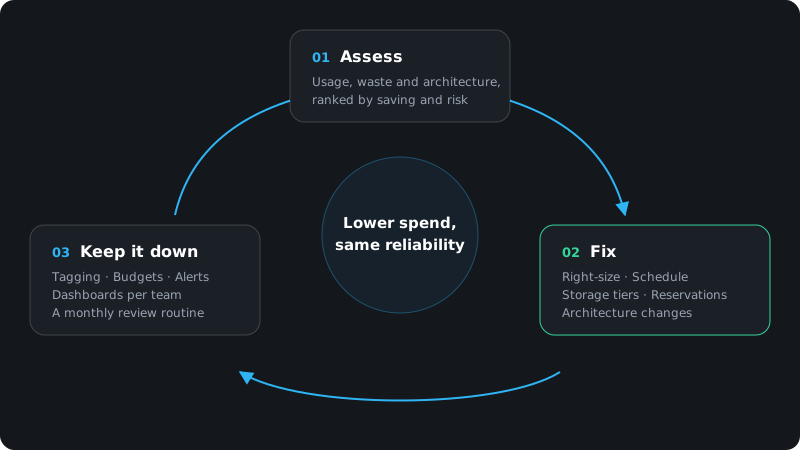
We treat cost as an engineering problem, not a finance report.
We review your Azure subscriptions or AWS accounts, resources, usage patterns and architecture, and talk to the people who run them. The result is a ranked list of savings, each with its effort and risk.
We make the changes with your team: right-sizing, scheduling, storage tiers, reservations and savings plans, and the architecture changes that remove cost for good. Every change is reviewed, tested and reversible.
We set up budgets, alerts, tagging and dashboards so new waste is visible early, and hand over a simple routine your team can keep running.
Switching a development or test environment off outside a 12-hour weekday window cuts its running hours by 64%. For resources billed by the hour, such as virtual machines, compute cost falls in step.
Source: Anvris calculation: 7 days × 24 hours compared with 5 days × 12 hours
Most engagements start with a fixed-scope assessment, so you see the opportunities and the effort before committing further. From there we either implement the plan with your team as a project, or stay on to keep costs in check over time. We agree the scope, team and pricing model with you before work starts.
You work directly with senior cloud engineers who have built and run production systems on Azure and AWS, not with a reporting tool or a sales layer. One engineer is your main point of contact throughout.
Our team works from Ho Chi Minh City (UTC+7). That's within an hour of Singapore and Malaysia, and gives four to five hours of shared working time with the Australian east coast every day. For clients in the US we agree an overlap window at the start and handle the rest asynchronously, with written updates.
It shouldn't, and we plan every change so it doesn't. We base sizing on measured usage, make changes in stages, and agree a rollback for each one before it goes live.
For the assessment, read-only access to cost and resource data is enough. For implementation we work with whatever access model your team is comfortable with, including making changes through your own pipelines and reviews.
Those tools show where the money goes and suggest generic changes. We work out which changes are safe for your workloads, make them in code and configuration, and fix the architecture choices that drive the cost in the first place.
It depends on the size of your cloud estate. We agree the timeline when we scope the assessment with you.
Services
Cloud & Platform
Migrate, modernise and build on Microsoft Azure or AWS, with infrastructure as code, automated pipelines and monitoring from day one.
Artificial Intelligence
AI agents, copilots and workflow automation that take repetitive work off your team, built safely on your own data and systems.
Team Extension
Senior engineers in Ho Chi Minh City who join your product as a dedicated team, work your hours and your way, and own their outcomes.
Product Engineering
Web platforms, mobile apps and APIs built cloud-native from the start: fast for your users and easy for your team to change.
UX/UI & Brand
Research-led UX and UI design, design systems and brand identity that make your product clear, consistent and easy to use.
Tell us a little about your Azure or AWS setup and we'll suggest where to start.